Bringing Holiday Magic to Life: The Art of Watercolor Santa Claus in Procreate
The holiday season is a time for warmth, nostalgia, and creativity. For digital artists, capturing the whimsical charm of a classic Watercolor Santa Claus offers a unique opportunity to blend traditional artistic techniques with modern technology. Whether you are an experienced illustrator looking to expand your portfolio or a beginner eager to learn the ropes, mastering this style can transform your creative workflow. By utilizing a curated palette and following a structured Tutorial, creating illustrations in Procreate becomes easier and more fun when you have a consistent or themed color palette.
This guide explores how carefully selected resources can elevate your art, allowing you to focus on the creative process without the distraction of searching for the right colors. We will delve into the significance of digital swatches, the step-by-step creation of a festive masterpiece, and how these tools fit into the broader landscape of digital education and professional illustration.
The Power of a Curated Color Palette
One of the most common hurdles artists face—both analog and digital—is color selection. Spending hours trying to mix the perfect shade of crimson for Santa's suit or the exact hue of pine green for his background can stall momentum and drain creative energy. This is where a pre-designed Procreate color palette becomes an invaluable asset.
When you add carefully selected palettes to your collection of resources for Procreate, you are essentially streamlining your decision-making process. A themed palette ensures harmony across your artwork. For a Watercolor Santa illustration, the colors need to evoke specific feelings: the crispness of winter snow, the warmth of a cozy fireplace, and the vibrant joy of the holidays. A good palette provides these nuances instantly.
Why Consistency Matters in Digital Art
In the realm of modern digital illustration, consistency is key. Whether you are creating a series of greeting cards, social media graphics, or a children's book, maintaining a cohesive look is essential. A dedicated Watercolor Santa Claus palette guarantees that every stroke aligns with the intended aesthetic. This allows you to:
- Save Time: Skip the trial-and-error phase of color mixing.
- Enhance Focus: Concentrate on brushwork, composition, and texture rather than hue selection.
- Improve Quality: Ensure that colors work together harmoniously from the very first sketch.
Getting Started: What You Need to Create Your Masterpiece
To begin your journey into creating stunning watercolor-style Santa illustrations, you need the right toolkit. While Procreate is a powerful app on its own, having the correct assets makes the difference between a flat image and a textured, lively painting. Our comprehensive resource pack is designed to support artists at every level.
Understanding the Resource Pack
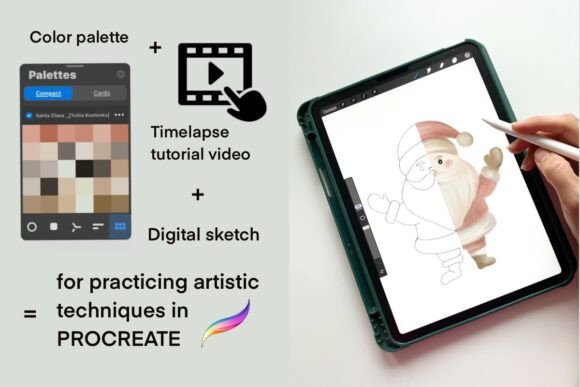
This product is perfect for practicing your artistic techniques in a relaxed environment, whether you are a beginner or an experienced artist. Here is a breakdown of what is included to help you get started immediately:
- 1 Digital Sketch (PNG Format): Included is a high-quality line art sketch of Santa Claus with a transparent background. This serves as your foundation, ensuring that your proportions are perfect before you even pick up a brush.
- 1 Color Palette (.swatches Format): Specifically formatted for Procreate, this file contains all the necessary shades to achieve a realistic yet stylized watercolor effect. From deep reds to soft whites, every color has been chosen to mimic the fluidity of real watercolors.
- Time-Lapse Video Tutorial: Learning by watching is one of the most effective methods. You will receive a link to a YouTube playlist via a PDF file, guiding you through the entire process step-by-step.
Step-by-Step: Installing Your Swatches in Procreate
A common misunderstanding among new users is how to import custom palettes into the iPad. Unlike physical paint tubes, digital assets require a specific workflow to integrate seamlessly into the app. Follow this clear guide to ensure your Watercolor Santa colors are ready to go.
Installation Instructions for Beginners
Warning for beginners: you must have the Procreate app installed on your iPad to use this color swatch file. Without the application, the .swatches file cannot be utilized. Once you have confirmed your setup, proceed with these steps:
- Download and Unzip: First, upload the compressed file containing your resources to the Downloads folder on your iPad using the Files app.
- Locate the File: Open the Files app, navigate to the Downloads folder, and tap on the zipped file to unzip it automatically.
- Import to Procreate: Tap on the unzipped
.swatchesfile. A prompt should appear asking which app to open the file with. Select Procreate. - Automatic Addition: Upon selecting Procreate, the app will recognize the file format. The swatch name will automatically be added to your Color Smudge menu within the app.
Once installed, you can access your new palette anytime by tapping the color circle in the top toolbar and selecting the "Swatches" tab. Look for the newly added set named specifically for this project.
The Creative Process: From Sketch to Finished Illustration
With your tools prepared, the actual painting process begins. The beauty of the watercolor style in Procreate lies in its ability to mimic the unpredictability and transparency of real water-based paints. Using the provided tutorial, you will learn to layer colors, create gradients, and add texture to bring Santa to life.
Techniques for Realistic Watercolor Effects
Creating a convincing watercolor look requires understanding how light interacts with pigment. In a digital environment, this is achieved through opacity control and blending modes. The Tutorial included in your resource pack demonstrates how to:
- Layer Transparently: Start with light washes of color and build up depth gradually, just as you would on paper.
- Utilize Grain and Texture: Apply subtle grain overlays to simulate the texture of watercolor paper, adding a tactile feel to the digital image.
- Blend Edges Softly: Use Procreate's smudge tool with low pressure to create those characteristic soft, bleeding edges found in traditional watercolor paintings.
By following these techniques, you avoid the "flat" look often associated with digital art. Instead, your Santa Claus illustration will possess depth, dimension, and the nostalgic charm of a hand-painted card.
Practical Relevance: Why Learn This Skill?
Beyond the immediate joy of creating a holiday image, learning to master themed palettes and digital watercolor techniques has significant practical relevance in today's creative economy.
Applications in Business and Education
For business owners and marketers, high-quality seasonal illustrations are essential for branding. Custom Watercolor Santa Claus images can be used for:
- Holiday email campaigns and newsletters.
- Social media posts to engage followers during the festive season.
- Printable merchandise such as mugs, tote bags, and greeting cards.
In the realm of education, these resources serve as excellent teaching aids. Instructors can use the provided sketches and palettes to teach students about color theory, composition, and digital brush dynamics. It simplifies the curriculum by removing the technical barrier of color selection, allowing students to focus purely on artistic expression.
Fitting Into Modern Creative Workflows
Modern life moves fast, and so does the demand for content. Having a library of reliable, themed resources allows creators to produce high-quality work efficiently. Instead of starting from scratch every time, you can adapt existing sketches and palettes to fit new projects. This efficiency is crucial for freelancers and full-time illustrators alike, enabling them to meet tight deadlines without sacrificing quality.
Clarifying Common Misunderstandings
As with any digital product, there are assumptions that potential users might make. It is important to clarify these points to ensure a smooth experience.
Digital vs. Physical Goods
Please note that these are digital items; physical goods are not shipped. You will not receive a box in the mail. Instead, you will receive instant access to download files that you can keep forever. This eco-friendly approach means you can start creating immediately after purchase, without waiting for shipping delays.
Device Compatibility
Another common assumption is that these files work on any tablet. However, the .swatches format is exclusive to the Procreate app on iPads. If you are using an Android tablet or a Windows PC, you will need to convert the colors manually or use a different software compatible with standard hex codes. Always ensure your hardware matches the software requirements before purchasing.
Conclusion: Embrace Your Creative Potential
Creating a beautiful Watercolor Santa Claus illustration is more than just a seasonal hobby; it is a gateway to mastering digital art fundamentals. By leveraging a consistent palette and following a structured Tutorial, you unlock a smoother, more enjoyable creative process. These resources empower you to focus on what truly matters: your imagination and your unique artistic voice.
Whether you are refining your skills for a professional career or simply enjoying a relaxing afternoon of digital painting, the combination of a high-quality sketch, a perfectly curated color set, and expert video guidance provides everything you need to succeed. So, install your swatches, open Procreate, and let the magic of the holidays flow through your fingertips. The world of digital watercolor awaits your touch.