Earth Bloom Procreate Color Palette Guide
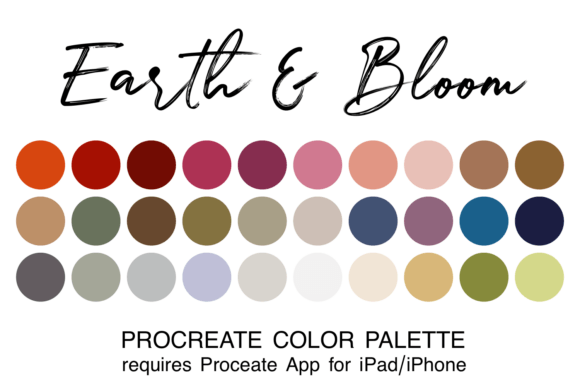
Creating digital art often feels like a balancing act between technical skill and creative flow. One of the most common hurdles artists face is the paralysis of choice when selecting colors. Instead of spending hours picking individual shades that might clash, you can streamline your workflow with the Earth Bloom Procreate Color Palette. This sophisticated collection offers 30 carefully curated colors designed to blend seamlessly together, featuring warm terracotta, muted roses, earthy browns, sage greens, and calming neutrals. By using this pre-coordinated set, you shift your focus from color theory struggles to the actual joy of creating.
The Organic Beauty of Curated Earth Tones
The appeal of the Earth Bloom palette lies in its ability to evoke the organic beauty of nature without requiring you to mix every shade manually. It captures a timeless aesthetic that feels both grounded and romantic. The inclusion of rich earth tones provides depth and stability, while soft, romantic hues add warmth and emotion to your work. This combination is particularly effective for designs that need to feel approachable yet sophisticated.
When you look at the specific colors included, you will notice they are not random selections. The warm terracotta acts as an anchor, reminiscent of sun-baked clay or autumn leaves. Paired with muted roses, it creates a gentle contrast that is easy on the eyes. The sage greens introduce a fresh, natural element, suggesting foliage and tranquility, while the earthy browns ground the composition. Finally, the calming neutrals provide the necessary breathing room, allowing the more vibrant tones to stand out without overwhelming the viewer. This thoughtful curation ensures that every color works in harmony with the others.
Why Professionals and Beginners Need Coordinated Swatches
Whether you are a seasoned professional or just starting your journey in digital illustration, having a coordinated color palette changes how you work. For beginners, the learning curve of understanding color relationships can be steep. Trying to find the perfect complementary shade often leads to frustration and inconsistent results. With the Earth Bloom Procreate Color Palette, you bypass this trial-and-error phase. You receive a ready-made system where every hue has been tested for compatibility.
For professionals, time is a valuable asset. In fast-paced environments like branding projects or wedding stationery design, clients expect cohesive visuals quickly. Having a versatile palette loaded into your Procreate app allows you to iterate faster. You can experiment with different compositions knowing that the underlying color structure is sound. This efficiency means you can dedicate more energy to refining details, textures, and overall composition rather than hunting for the right hex code.
Ideal Applications for Your Creative Projects
The versatility of these 30 colors makes them suitable for a wide range of applications across personal and commercial contexts. Because the palette balances warmth with neutrality, it adapts well to various styles and industries.
- Interior Design Concepts: Architects and designers can use these swatches to create mood boards for rooms that require a natural, spa-like atmosphere. The sage greens and terracottas are excellent for visualizing accent walls, textiles, and furniture finishes.
- Branding and Identity: Small business owners looking for an eco-friendly or artisanal brand image will find these tones perfect for logos, packaging, and social media graphics. They convey trust, sustainability, and warmth.
- Digital Art and Illustration: Artists working on character design or landscapes can utilize the full spectrum to build realistic lighting and shadow effects. The muted roses work beautifully for skin tones, while the browns and greens handle environmental elements effortlessly.
- Wedding Stationery: Couples planning weddings often seek a timeless look. This palette is ideal for designing invitations, menus, and save-the-date cards that feel elegant and romantic without being overly flashy.
How to Install and Use Your Swatch File
One of the greatest advantages of the Earth Bloom Procreate Color Palette is its ease of integration into your existing workflow. The product comes as a single file in the ".swatch" format, which is native to the Procreate app. This ensures that the colors load instantly and remain consistent across your projects.
If you are new to using external assets, the installation process is straightforward but requires a few specific steps. First, ensure you have the Procreate app installed on your iPad or iPhone, as this is the only platform that supports this specific file type. Once you have downloaded the zipped file, locate it in your "Downloads" folder within the Files app on your device.
- Open the Files app and navigate to your Downloads folder.
- Tap on the zipped file to unzip it automatically.
- Click directly on the resulting swatch filename (the .swatch file).
- This action triggers an automatic import, adding the palette directly to your Procreate library.
After completing these steps, simply open Procreate. To access your new colors, click on the colored dot icon in the top toolbar to open the color picker. Navigate to the palettes tab, and you will see the Earth Bloom collection ready to use. This seamless setup means you can start painting immediately without complex configuration.
Considerations Before You Start Creating
While the Earth Bloom palette is incredibly versatile, it is important to consider your project's specific needs before committing to it. Because the collection leans heavily towards organic and natural tones, it may not be the best fit for high-energy, neon, or futuristic cyberpunk themes. If your goal is to create something starkly modern or highly saturated, you might need to supplement this palette with additional colors.
Additionally, remember that color perception can vary slightly depending on the screen calibration of your device. While the swatches are curated for consistency, always review your final artwork on different screens if you plan to print physical materials like wedding invites or branded merchandise. Understanding these nuances helps you leverage the palette effectively while avoiding potential mismatches in the final output.
Ultimately, the value of the Earth Bloom Procreate Color Palette goes beyond just a list of colors. It represents a curated vision that saves time, reduces decision fatigue, and elevates the aesthetic quality of your work. Whether you are sketching a quick idea or building a comprehensive brand identity, having these 30 harmonious colors at your fingertips empowers you to create with confidence and clarity.