Unlocking Realism: The Ultimate Guide to the 50 Pencil Sketch Brush Bundle
In the rapidly evolving world of digital art, there is a persistent longing for the tangible. While pixels and vectors offer precision, they often lack the soulful imperfection found in traditional media. This is where the 50 Pencil Sketch Brush Bundle becomes an essential asset for creatives. It is not merely a collection of tools; it is a bridge between the analog charm of graphite on paper and the limitless possibilities of modern software. Whether you are a seasoned illustrator or a beginner taking your first steps into digital design, understanding how to leverage these brushes can transform your workflow and elevate the quality of your work.
The Evolution of Digital Drawing Tools
To appreciate the significance of this bundle, one must first understand the journey of digital sketching. Early digital art was often criticized for looking "too clean" or sterile. Brushes were uniform, lines were perfectly straight, and shading lacked the granular texture of real lead. Artists spent hours trying to mimic the friction of a pencil tip against rough paper, often with limited success.
Today, technology has caught up with tradition. Advanced brush engines in software like Adobe Photoshop allow for complex interactions that simulate physical laws—pressure sensitivity, angle variation, and texture blending. The pencil sketch brush is the pinnacle of this evolution. It mimics the delicate strokes of a pencil, creating a range of effects from soft, subtle shading to bold, dramatic lines. By integrating these tools, artists can capture the essence of pencil work without ever leaving their computer screens.
Why Realism Matters in Digital Art
Realism in digital art is not just about making something look like a photograph; it is about conveying emotion and texture. A hand-drawn sketch carries the energy of the artist's hand. The slight wobble in a line, the smudge of graphite, and the varying opacity of a stroke all tell a story. When digital artists use high-quality pencil sketch brushes, they infuse their creations with this organic, artistic feel.
This versatility is crucial for various applications:
- Character Design: Concept artists use these brushes to quickly iterate on character ideas, focusing on form and expression rather than perfect color.
- Architectural Visualization: Architects use sketchy overlays to give blueprints a human touch, making them more accessible to clients.
- Book Illustrations: Authors and illustrators create atmospheric scenes that evoke nostalgia and warmth.
Deep Dive: What Makes the 50 Pencil Sketch Brush Bundle Unique?
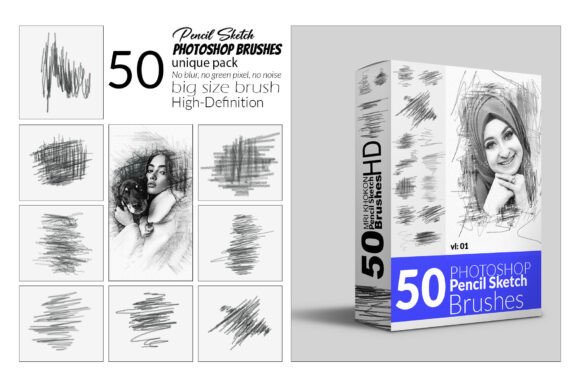
The 50 Pencil Sketch Brush Bundle is designed to be a comprehensive toolkit. It does not rely on a single effect but offers a diverse array of textures and behaviors to suit different artistic needs. Here is a breakdown of what makes this product stand out in a crowded market.
A Spectrum of Textures and Effects
One of the primary challenges in digital sketching is achieving variety. A standard brush might work well for outlines but fail miserably at shading. This bundle solves that by including fifty distinct variations. You will find brushes that emulate hard pencils (like 4H) for fine details, as well as soft charcoal-like brushes (like 6B) for deep, rich shadows.
The bundle also introduces dynamic elements such as the splash brush. While a traditional pencil cannot splash ink, this digital tool adds dynamic, artistic flair by combining sketch lines with watercolor-like textures. This allows for mixed-media techniques within a single file, enabling artists to layer dry graphite strokes over wet, fluid backgrounds seamlessly.
The Power of Sketch Actions
Beyond individual brushes, the bundle includes powerful pencil sketch actions. In the context of Photoshop, an action is a recorded sequence of commands. These specific actions can automatically convert a photograph into a stylized pencil drawing with a single click. However, unlike basic filters that often look artificial, these actions are calibrated to work in harmony with the manual brushes in the set. They provide a natural hand-drawn look with each stroke, ensuring that the final result retains the integrity of an original sketch.
For example, if you have a portrait photo and want to turn it into a monochrome study, you can apply the sketch action to generate the base layers. Then, using the included pen sketching brushes, you can refine the eyes, add depth to the hair, and correct any areas where the automation missed the mark. This hybrid approach saves time while maintaining artistic control.
Technical Specifications and Compatibility
When investing in digital assets, compatibility is paramount. No artist wants to purchase a tool only to find it incompatible with their current software version. The 50 Pencil Sketch Brush Bundle is built with robust technical standards to ensure broad usability.
File Formats and Installation
The core of this product consists of files in the standard Photoshop ABR (Adobe Brush) format. This is the industry standard for custom brushes, ensuring that they can be easily loaded into the Photoshop brush panel. The package also includes a helpful installation guide and a help file, which is particularly useful for beginners who may be unfamiliar with loading third-party assets.
Installation is straightforward:
- Open Adobe Photoshop.
- Navigate to the Brush Preset menu.
- Select "Import Brushes" and locate the downloaded ABR file.
- The new set of 50 brushes will instantly appear in your toolbar, ready for use.
Software Version Requirements
This bundle has been rigorously tested across multiple versions of Adobe Photoshop to guarantee stability. It is fully compatible with:
- Photoshop CC 2015.5 (The baseline working version)
- Photoshop CC 2017
- Photoshop CC 2018
- Photoshop CC 2019
- Photoshop CC 2020
- Photoshop CC 2021 and later versions
This wide range of compatibility means that whether you are running a slightly older machine or the latest Creative Cloud subscription, the tools will function as intended. The English version of the software ensures that all menus and documentation are accessible to a global audience.
Practical Applications in Modern Creativity
The utility of the 50 Pencil Sketch Brush Bundle extends far beyond hobbyist drawing. In today's professional landscape, the ability to produce high-quality sketches quickly is a valuable skill.
Education and Learning
For students of art and design, these brushes serve as an excellent learning aid. They allow learners to focus on composition, anatomy, and lighting without being hindered by the limitations of low-quality digital tools. Teachers can assign projects that require traditional sketching techniques, knowing that students can execute them digitally with realistic results.
Business and Marketing
In the business world, authenticity sells. Brands often use hand-drawn aesthetics in marketing materials to appear more approachable and human. Using the pencil sketch brush bundle, graphic designers can create unique logos, packaging concepts, and social media graphics that stand out from the sea of vector-perfect designs. The organic nature of the sketches creates an emotional connection with the audience that rigid geometry often fails to achieve.
Mixed Media Experimentation
Modern creativity thrives on experimentation. The flexibility of this bundle encourages artists to break boundaries. You can start with a digital photograph, apply a sketch action to create a textured background, and then paint over it with the splash brush to add vibrant, watercolor-like accents. This layering technique opens up endless possibilities for creating posters, album covers, and editorial illustrations.
Common Misconceptions About Digital Sketching
Despite its popularity, there are still misunderstandings surrounding digital sketching tools.
Misconception 1: "Digital sketches look fake."
This was true ten years ago, but not anymore. With high-fidelity brushes like those in this bundle, the difference between a digital sketch and a scanned physical sketch is often indistinguishable to the naked eye. The key lies in the brush settings and the artist's technique, not the medium itself.
Misconception 2: "You need expensive hardware."
While a high-end tablet enhances the experience, these brushes are optimized to work well even with entry-level drawing tablets or even a mouse (though a stylus is recommended for pressure sensitivity). The value of the brush pack lies in its algorithmic complexity, not just the hardware it runs on.
Misconception 3: "It replaces traditional drawing skills."
On the contrary, mastering these digital tools often requires a strong foundation in traditional drawing principles. Understanding how light hits a surface, how to construct a figure, and how to shade effectively is still required. The brushes are simply the vehicle through which these skills are expressed.
Conclusion: Elevating Your Artistic Journey
The 50 Pencil Sketch Brush Bundle represents more than just a download; it is an invitation to explore the intersection of technology and tradition. By offering a vast array of textures, from delicate lines to bold splashes, it empowers artists to express themselves with unprecedented freedom. Its seamless integration with Photoshop, combined with its extensive compatibility across versions, makes it a reliable companion for both casual creators and professional studios.
Whether you are designing a detailed portrait, creating a quick concept sketch, or experimenting with mixed media, these tools bring an organic, artistic feel to your digital creations. In a world dominated by sleek, synthetic imagery, the ability to recreate the warmth and charm of a hand-drawn pencil sketch is a superpower. Embrace the versatility, unlock your creativity, and let your digital artwork speak with the authentic voice of traditional art.