Waffles Sketch Color Palette: A Practical Guide for Better Digital Art
Digital art tools often promise simplicity, but the reality of creating a cohesive piece can be surprisingly complex. For artists looking to refine their skills without the pressure of starting from a blank canvas, the Waffles Sketch Color Palette offers a structured yet playful approach. Whether you are a beginner trying to understand color theory or an experienced illustrator seeking a quick warm-up routine, this resource combines specific sketch templates with curated swatches to streamline your creative process. However, simply downloading a palette does not guarantee a successful outcome. Understanding how to integrate these assets into your workflow is just as important as having them in the first place.
Understanding the Value of Curated Sketch Resources
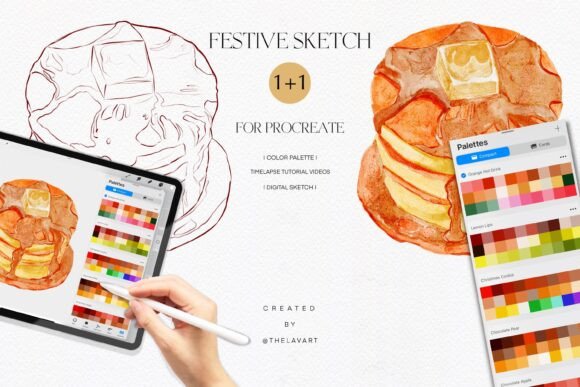
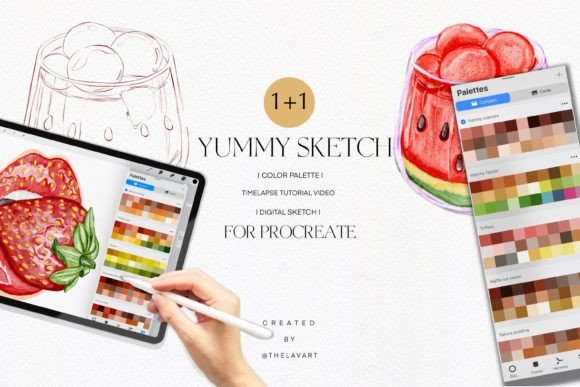
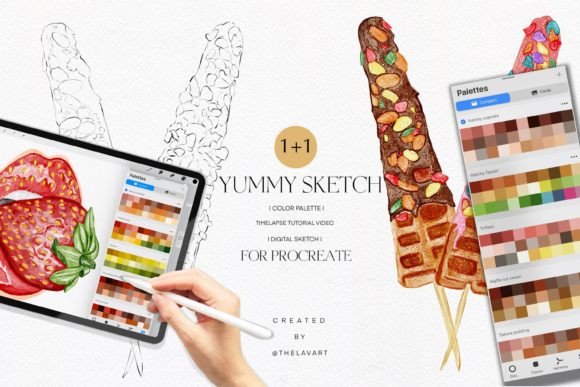
The appeal of the Waffles Sketch Color Palette and its companion, the Yummy Sketch Color Palette, lies in their ability to remove decision paralysis. When faced with an empty Procreate canvas, many creators spend more time choosing colors than actually drawing. These palettes provide a pre-selected harmony of tones designed specifically for food-themed illustrations, bringing warmth and appetizing vibrancy to your work. The inclusion of high-quality PNG sketches with transparent backgrounds allows you to focus on coloring techniques, layering, and texture rather than struggling with line art.
For educators and hobbyists alike, these resources serve as excellent study aids. They allow you to practice specific shading methods, such as cel-shading or soft blending, within a controlled environment. The time-lapse video tutorials included in the package further bridge the gap between passive learning and active creation, showing exactly how the artist approaches light and shadow. Yet, despite these benefits, users often encounter hurdles that stem from misunderstandings about how digital assets function.
Common Pitfalls When Using Digital Sketches and Palettes
One of the most frequent mistakes I see artists make is treating the provided color swatches as absolute rules rather than flexible guidelines. It is tempting to apply the exact hex codes from the Waffles Sketch Color Palette directly onto every part of the illustration without considering the lighting conditions of your specific scene. This rigid adherence can result in flat, lifeless images that lack depth. Colors interact differently depending on the surrounding hues and the direction of the light source. If you copy a tutorial's color application without adjusting for your own composition, the final result may look disjointed or unnatural.
Another overlooked detail involves file management and format compatibility. Many users download the .swatches file expecting it to appear instantly in their Procreate library, only to find they cannot locate it later. Without understanding the import process, valuable time is lost troubleshooting instead of creating. Similarly, the PNG sketches are sometimes treated as finished products. Users may attempt to print these low-resolution previews or use them in commercial projects without checking the licensing terms or resolution limits, leading to pixelated outputs or legal complications.
There is also a misconception regarding the learning curve. Some assume that because a time-lapse video is included, they will automatically master the technique after watching once. Artistic skill is developed through repetition and analysis, not just observation. Watching a speed-painted video without pausing to replicate the brush strokes or analyze the layer structure means missing the core educational value of the tutorial.
How Mistakes Impact Your Workflow and Results
These oversights can significantly affect the quality and efficiency of your artistic output. Rigidly following a color palette without adaptation leads to artwork that feels generic, lacking the unique signature that defines a professional portfolio. In a competitive market where clients and audiences seek originality, relying too heavily on presets can stall your growth as an artist. Furthermore, poor file management creates frustration and breaks your creative flow. Every minute spent searching for a missing swatch file or fixing a blurry image is a minute taken away from actual creation.
For entrepreneurs and marketers using these assets for social media content, the stakes are even higher. Low-resolution images or inconsistent branding colors can diminish the perceived professionalism of a business. If you are an educator teaching students, presenting a method that encourages rote copying over critical thinking fails to equip learners with the adaptability they need for real-world commissions.
Better Approaches to Maximizing Your Tools
To get the most out of the Waffles Sketch Color Palette, adopt a mindset of experimentation rather than replication. Start by importing the .swatches file correctly into Procreate. Ensure you are dragging the file directly into the color panel or using the "Import" feature properly so the palette saves to your collection. Once loaded, treat the colors as a starting point. Try shifting the saturation or brightness of a base color to see how it changes the mood of the waffle illustration. Experiment with adding a complementary accent color that isn't in the original set to make your work stand out.
When working with the PNG sketches, do not simply fill the shapes. Use the transparent background to your advantage by placing the sketch on top of a textured paper layer or a gradient background. This adds immediate depth and context. Pay close attention to the time-lapse videos included in the PDF link. Pause the video at key moments—such as when the artist applies shadows or highlights—and try to recreate that specific step on your own canvas before moving forward. This active engagement transforms a passive viewing experience into a genuine learning session.
What to Check Before You Begin
Before diving into a project, take a moment to verify a few technical details. First, ensure your Procreate version is compatible with the .swatches format provided. While rare, older versions of the app may require manual conversion. Second, review the license agreement included in the PDF documentation. Understand clearly whether the sketches and palettes are for personal practice, commercial use, or both. If you plan to sell prints or use the designs for client work, confirm that the terms allow it.
Finally, assess your own goals for the session. Are you practicing color harmony, or are you trying to finish a commission? If the goal is practice, give yourself permission to make mistakes and deviate from the tutorial. If the goal is a finished product, plan your layers and lighting scheme before applying the first stroke. By approaching the Waffles Sketch Color Palette and Yummy Sketch Color Palette with intention and technical awareness, you transform simple digital downloads into powerful tools for artistic development. This balanced approach ensures that your practice sessions remain relaxing and fun while steadily improving your technical proficiency.